Dressmaker Quality and Grain: Three Scores, One Published Sentence
Grain direction, the Quality target and fabric tags are three separate scores. Only one is explained officially, and the ceiling turns out to be routine rather than rare.
Applies to: Quality scoring and grain direction in Dressmaker — the Quality target on a commission, the Grain Quality figure shown on each panel in the cutting room, the style tags printed on fabric, print alignment and fabric assignment — checked October 19, 2026 against the Steam store listing, the Steam achievement definitions and global achievement percentages for app 4019220, all ten official Steam announcements and the Build 443 patch notes
Quick answer
Three different numbers get called quality in Dressmaker, and only one has an official explanation. The Quality target on a commission — 80 in the official screenshot — is what that customer asks for, shown as a live counter reading 0/80. Grain Quality, labelled on every cut panel in the cutting room, is a percentage attached to that single cut piece; every official screenshot shows it at 100%, and no official text explains what a lower figure changes. The third is the style tags printed on the bolt, such as Flowers 100 and Patterned 100, which are what a requirement written as "Flowers: 60" is measured against. An official achievement reads "Achieve 100% quality on a dress" and 78.1% of players have unlocked it, so the ceiling is routine rather than rare. The developer's one sentence about grain says that whether your pattern is aligned to the grain or cut on bias is what appears on the final dress — a statement about appearance, with no score or penalty named.
At a glance
Three different numbers in Dressmaker get called quality, and they are not the same number. One is a target a customer sets. One is a percentage attached to a single cut piece of fabric. One is a pool of style tags printed on the bolt before you buy it. Almost every "quality too low" search is somebody reading one of these as another, and the game never puts them side by side to explain the difference.
The good news is that the ceiling is not a mystery. There is an official achievement whose stated requirement is "Achieve 100% quality on a dress", and Steam's global achievement data shows 78.1% of players have unlocked it. A hundred percent is reachable, it is reached routinely, and it is not the wall that the search volume suggests. What is genuinely undocumented is the arithmetic: which of your decisions move that number, and by how much.
| Question | Short answer | Basis |
|---|---|---|
| Is there a maximum quality? | Yes. 100% is the stated target of an achievement, and 78.1% of players have it | Steam achievement definition and the global achievement API |
| What is "Quality: 80" on a commission? | The customer's target, tracked live as a counter reading 0/80 | Official store screenshot of an open commission |
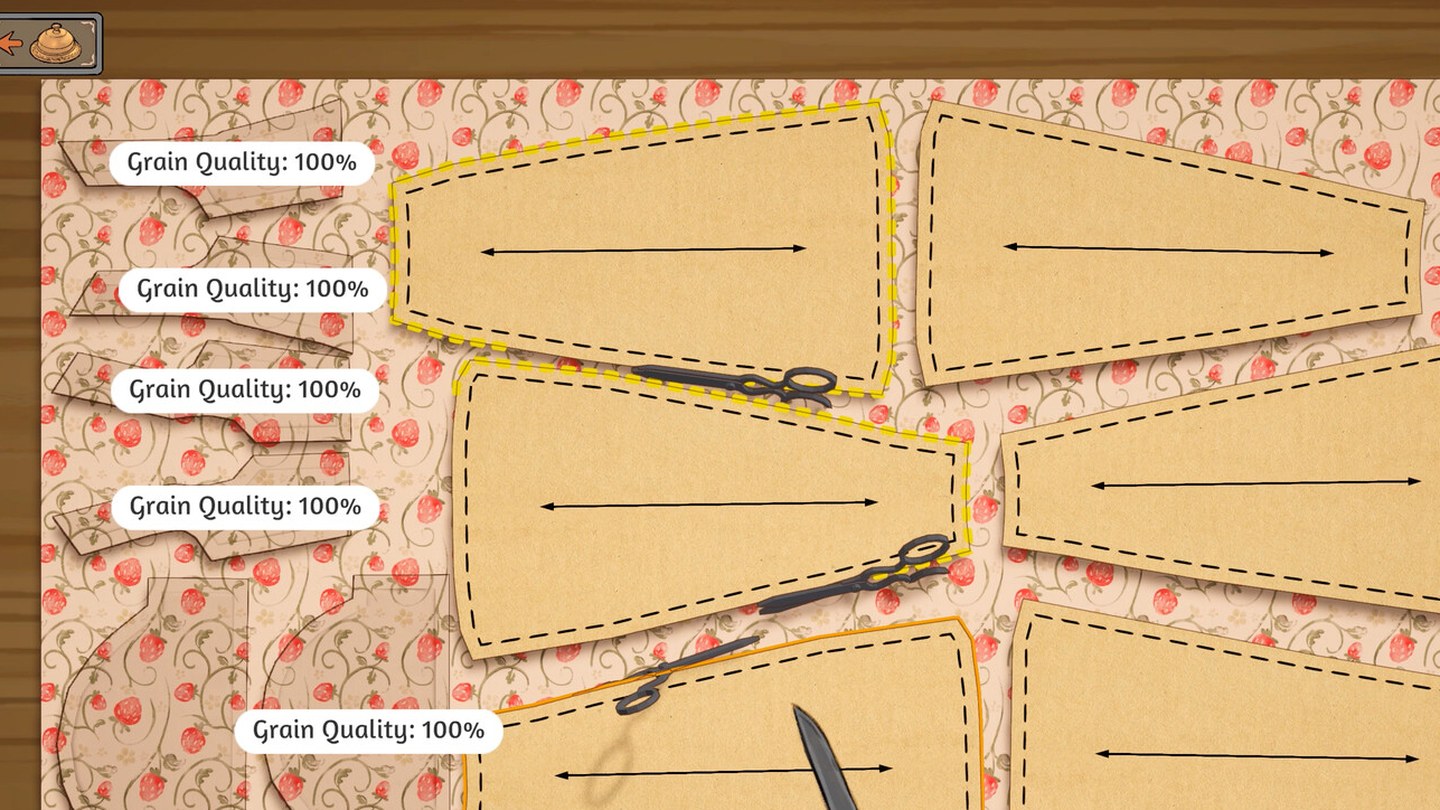
| What is "Grain Quality: 100%"? | A per-panel figure shown on every cut piece in the cutting room | Official store screenshot of the cutting table |
| Does cutting against the grain cost you anything? | Nobody has published that, in either direction | Absent from the store text, all ten announcements and every patch note |
| Does the order or position of fabric matter? | Not documented, and the question as usually asked rests on a mistaken premise | Absent from all official text; addressed below |
One warning before the detail, because it decides how you should read the rest of this page. Dressmaker's official text uses the word pattern to mean a dressmaking pattern — the paper shape you cut fabric to — not a printed motif. The store description says "arrange and cut out your dress pattern", and the alt text on the cutting-room video reads "pattern pieces being cut out of a roll of fabric". So when the developer writes about patterns, they are writing about shapes, not flowers. That single ambiguity accounts for a large share of the confusion around print alignment, and it is handled directly in its own section below.
The three numbers all called quality
Before anything else can make sense, these need separating. They appear in different scenes, they are produced by different actions, and only one of them has been described by the developer.
| Figure | Where you see it | What it measures |
|---|---|---|
| Quality (a target) | The commission brief and the sketchbook, as Quality: 80 in the requirements and 0/80 in the live counter | What this customer wants from this dress |
| Grain Quality (a percentage) | The cutting room, labelled on every panel piece as Grain Quality: 100% | How that one panel sits relative to the grain of the fabric it was cut from |
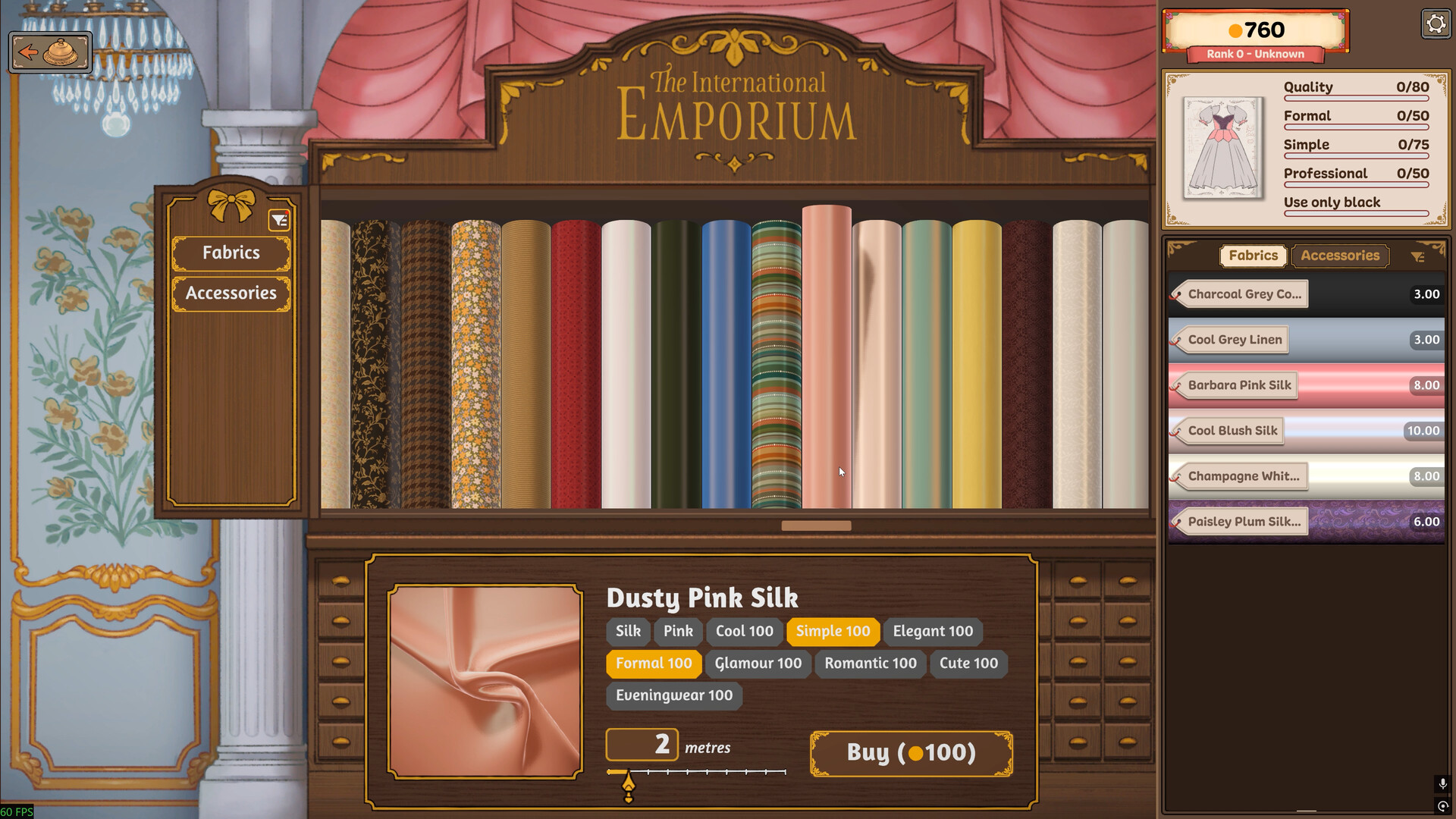
| Style tags (a pool of values) | The fabric panel on the bolt: Flowers 100, Patterned 100, Casual 50, Cool 50 | What the fabric contributes toward requirements written as tags |
The targets in the first row are sometimes tags and sometimes not, which is the second source of confusion. In the official commission screenshot the brief lists Quality: 80, Eveningwear: 40, Romantic: 60, Flowers: 60, Flower: at least 3 and Budget: 750. Four of those are scores and one is a count — "at least 3" flowers describes how many appliqué flowers to place, not a value to accumulate. A player who reads all five as scores will keep adding flowers past the point where it helps and wonder why the counter will not move.
The second row is the one this page is mostly about, and the third row is what the troubleshooting page deals with when a requirement will not turn green. Neither of those pages states what any of these figures do to a sale price, because no source does; the money page sets out why that link remains unproven.
Grain direction: the one official sentence
The developer has written about grain exactly once. It is the second paragraph of the store description, and it is worth having in full rather than paraphrased, because both its content and its boundary matter:
— Steam store description, Dressmaker
Read the verbs carefully, because they define what has actually been promised. Your pattern can be aligned to the grain or cut on bias — that is real dressmaking vocabulary, and it names the two extremes: straight along the weave, or on the diagonal. What results is described as "what appears on the final dress". That is a statement about appearance. It is not a statement about a score, a grade, a payment or a penalty.
This distinction is not pedantry. Every guide currently circulating that tells you cutting against the grain will cost you points or coin is extending a sentence past what it says. The honest reading is: the developer has confirmed that grain handling changes how the finished garment looks, and has said nothing about whether it changes anything the game measures.
What the game itself shows is more concrete than the text, and it is visible in the cutting room. Every panel piece carries a double-headed arrow running lengthwise down its centre. That arrow is the grain line, and it is the thing you are lining up against the direction of the weave in the fabric underneath. The next section deals with the number attached to it.
Grain Quality in the cutting room
While you are arranging pieces on the bolt, each one is labelled. In the official cutting-table screenshot all five visible pieces read Grain Quality: 100%, and this is the figure players search for by name.
Three things can be said about it from the evidence, and no more.
It is per panel, not per dress. Five panels on that table carry five separate labels. That is a structural fact visible on the screen, not an inference: whatever the number measures, it is measured on each cut piece rather than assigned once to the garment.
It is shown while you are cutting, not after. The label belongs to the cutting room, alongside the scissors and the fabric panel. The sewing scene, checked in its own official screenshot, shows no quality figure at all — it shows SEWING COMPLETE and a Finish Dress button, and nothing else about scoring. So this is feedback you can act on at the moment you rotate a piece or drag it to a different spot on the bolt.
One hundred percent is achievable. Every panel in the official screenshot reads 100%, and the achievement for a 100% dress has been unlocked by 78.1% of players. Whatever the penalty for a lower figure is, it is evidently avoidable in normal play, and most players are avoiding it.
There is a practical consequence worth stating plainly, since it is the only defensible advice available. Because the label is live and per panel, you can fix a misaligned piece before it is committed rather than discovering it later. If you want to know whether a specific panel is costing you something, the experiment is cheap: note the dress's quality counter, rotate one piece off the grain until its label drops, finish the dress, and compare. That is an experiment you can run in ten minutes. It is not something anyone has published, and this page will not claim a result it has not seen.
The Quality target on a commission
The number that customers actually specify is a threshold, and the interface presents it as a progress counter rather than a grade. The official commission screenshot shows Quality: 80 in the requirements list and Quality: 0/80 in the panel beside it, because the dress has not been made yet. The same pattern holds for the tag requirements: Eveningwear: 40 against 0/40, Romantic: 60 against 0/60.
That reading matters for how you work. A counter reading 0/80 is not telling you that you have scored zero out of a hundred and failed. It is telling you that this dress is early, and that the ceiling for this commission is 80 rather than 100. A 100% dress and an 80% commission are not in conflict; the commission simply stops asking at 80.
The 100% ceiling itself is documented in an unusual place — not in the store text, not in any announcement, but in the achievement list. The achievement named 99 Problems But A Stitch Ain't One carries the description "Achieve 100% quality on a dress". That is the closest the game comes to a definition of the top of the scale, and it is as close as it gets: the achievement names the goal, and describes none of the route to it.
| Established | Not established |
|---|---|
| 100% quality on a single dress is achievable | What contributes to the quality figure, or in what proportion |
| 78.1% of players have achieved it, checked October 19, 2026 | Whether grain, tags, trim or accessories feed it, and at what weight |
| The achievement is not hidden, so the game advertises the goal openly | Whether 100 is a hard cap or simply where this achievement sits |
That 78.1% deserves a moment, because it reframes the problem most people arrive with. If four in five players have hit a perfect dress, then "my quality is too low" is rarely a question about difficulty. It is much more often one of three specific situations: a target above what this fabric can reach, a requirement being read as a score when it is a count, or a dress that is simply unfinished. The commission troubleshooting page covers the third in detail, including the two different buttons that both get called the finish button.
What Build 443 actually changed
The October patch is widely quoted as having "changed how quality works", and that is not what it says. Here is the bullet in full:
— Cozy Lives, "October Patch Notes - Build 443", October 14, 2026
Three details in that bullet do most of the work, and none of them is about the quality percentage.
It is about colour and fabric type requirements, not about quality. The sentence names its own subject twice. If a customer has asked for a particular colour or a particular fabric type, that is the requirement whose scoring changed — not the overall quality figure.
The change is a weighting correction, and the before-state is stated. Colour and fabric type used to be counted as a flat percentage of the dress's total fabric area. A collar or a pair of sleeves is a small fraction of a gown's surface, so a collar in the right fabric barely moved the number. Build 443 gives small components a boost so they count for something. The developer's own framing is that this matches "most players' intuitive expectations" — the recognition that a player expects the collar they carefully matched to matter.
Tags were already scored this way. That last sentence is the one people skip, and it is the informative one. It tells you that tags and colour/fabric-type requirements are scored by two different mechanisms, and that only one of them was wrong. Whatever a Flowers 60 requirement does under the hood, Build 443 did not change it.
The bullet closes with an admission worth respecting, and worth knowing if you have an old save: dresses made before the patch may now display a slightly different score. The patch notes address this directly elsewhere, writing that making a change which retroactively affects a save "is not a decision that we take lightly, and we truly agonise over any change that could affect existing dresses, no matter how small". If a dress you were proud of reads lower than you remember, that is the likely cause, and it is arithmetic rather than decay.
Aligning a floral print across the seams
"How to make a floral pattern line up" is one of the larger searches attached to this game, and answering it properly means separating two different meanings of one word — because the official material only ever discusses one of them.
In dressmaking, a pattern is the paper shape. The printed flowers on the cotton are not the pattern; they are the print, and the trade term for matching them across a seam is pattern matching or print alignment. Dressmaker's developer uses the first meaning consistently. The store text says "Arrange and cut out your dress pattern", and asks whether "your pattern is aligned to the grain or cut on bias". The cutting-room video is captioned "pattern pieces being cut out of a roll of fabric". Nowhere does the word refer to the motif.
So what does the game actually let you control, given that?
Two things are visible in the official cutting-room screenshot, and both are real. First, each panel can be rotated and positioned independently on the bolt — that is the arranging the store text is describing. Second, the fabric in that screenshot is a repeating floral print, and the panels sit at different positions over it, so different pieces will carry different fragments of the motif. The visual consequence is beyond argument: where you place a piece over a print decides which part of the print that piece gets.
What is not documented, anywhere, is whether aligning the print across seams is rewarded, penalised, or ignored. No official text mentions print alignment. No patch note addresses it. Nothing in the achievement list refers to it. The developer's one sentence about arranging fabric says that your arrangement is "what appears on the final dress" — which covers appearance and stops there.
Does the order you put fabric on the mannequin matter?
This is a common question and it contains a mistaken premise worth untangling, because the answer depends entirely on which thing you meant.
If you meant is there an order in which the game wants fabric applied, the answer is that this is not how the game works. You do not load fabric onto a mannequin in sequence. In the sketchbook you assign fabric to individual panels of a garment — the official screenshot of a draft lists the chosen pieces as Milkmaid Bodice, Whirlpool Collar, Fae Sleeve and Single Tiered Skirt, with the note Approx. 3.85m fabric required. The store description frames this as a feature: "Take full control over what fabric to use for each panel of your garment." There is no queue to get wrong, only a set of assignments to get right.
If you meant does which fabric you assign to which panel change the outcome, then yes, by the developer's own account — but the mechanism is requirements, not sequence. Build 443's scoring change is written entirely in terms of panels and their area: colour and fabric type were previously "a raw % of area of each panel relative to the total area of fabric used in the dress", and small components now get a boost. That is a statement about which panels you dress in which fabric, and how much each one counts. It says nothing about the order in which you did it.
If you meant does the order I cut pieces off the bolt change anything, there is no published answer. The only ordering-adjacent mechanic in the patch notes is a convenience: Build 443 added a button that grabs all panel pieces from the cutting room at once, which suggests the pieces are gathered as a set rather than a sequence.
The practical reading, then: stop thinking about order, start thinking about assignment. The decision that has documented consequences is which fabric goes on which panel, especially the small ones that Build 443 just made count for more.
Still unpublished
Six questions that decide how you play, and where the official record stops:
| Question | Status |
|---|---|
| What is the quality figure made of? | Unpublished. No source lists its inputs, their weights or their order of application. |
| What does Grain Quality below 100% do? | Unpublished. The figure is displayed per panel; its consequence is described nowhere. |
| Is print alignment across seams scored? | Unpublished. The word pattern in the official text means the paper shape, not the motif. |
| Does 100 count as a hard cap? | Unconfirmed. The achievement asks for 100%, which establishes it as reachable, not as a verified ceiling. |
| Do trim and accessories add to quality? | Unpublished. The trim achievement measures 50m of trim on one dress; no scoring relationship is stated. |
| What do the stars beside a customer mean? | Unexplained. The official delivery screenshot shows one filled star beside warm dialogue, and no official text defines the scale. |
That last one is worth a sentence, because it is the figure most often mistaken for a quality grade. The official screenshot of a delivered commission shows a customer saying "Oh, how wonderful. This is MY dress, exactly as I wanted it." while one star out of five is filled. A player reading that panel as a quality score would conclude they had scored twenty percent on a dress the customer had just praised without qualification. Whatever the stars measure, the image itself is evidence against the simplest reading of them.
Sources and review scope
- Dressmaker on Steam — source for the store description, including the single sentence on grain and bias, the per-panel fabric sentence, the panel-piece caption on the cutting-room video, and the official screenshots used above. Checked October 19, 2026.
- Dressmaker achievement list on Steam — source for the achievement 99 Problems But A Stitch Ain't One and its description "Achieve 100% quality on a dress", together with the other thirty-one achievements, their display names and their stated requirements. Checked October 19, 2026.
- Steam global achievement percentages for app 4019220 — source for the 78.1% global unlock rate for MAX_QUALITY. This is a live figure and will drift; it was 78.1% on October 19, 2026.
- Cozy Lives, "October Patch Notes - Build 443", October 14, 2026 — source for the colour and fabric type scoring change, quoted verbatim, and for the note that tags were already calculated that way.
- All ten official Steam announcements for Dressmaker, July 28 to October 14, 2026 — searched for every mention of grain, bias, quality, floral, panel and score. Grain, bias and floral appear in none of them.
- Official Dressmaker screenshots published on the Steam store page — the cutting table (five panels each labelled Grain Quality 100%, each carrying a lengthwise grain arrow, with fabric tags visible on the bolt) and the open commission (Quality 80 against a live 0/80 counter). The image at the top of this page is a crop of the official cutting-table screenshot, used unmodified apart from the crop.
Scope note: this page covers quality scoring and grain direction as they are described in official material. It does not give a quality formula, an alignment rule or a fabric-order rule, because none of the three exists in any source reviewed. The only experiment described here is one you can run yourself, and this page does not report the result of it. No part of the game was played to produce this page.
Checked on October 19, 2026 against the Steam store listing and the Steam Web API for app 4019220, the developer's own Steam announcements, the official press kit at freelives.net and the itch.io prototype page. Patch notes are quoted verbatim rather than summarised, and each quotation carries the build number and the date it was published. Player reports come from public Steam discussion threads and are labelled as player reports wherever they appear; they are never presented as developer statements, and they are never used to fill a gap the developer left open. Where a detail has not been published, the page says so instead of estimating it. No part of this game was played to produce this page.
Not independently play-tested. This is not a claim that every platform or game version was tested. Source review: Oct 19, 2026.
More Dressmaker Guides
 Dressmaker
Dressmaker Controls After Build 443: Zoom, Pan and Orbit, Mapped
The camera was rebuilt in the October patch and most guides still describe the old one. Here are the current bindings for every scene, the exact wording of what changed, and why gamepad and trackpad users are still waiting.
 Dressmaker
Dressmaker: Why the Finish Button Won't Appear on a Commission
A commission that will not submit is usually an unfinished step, not a bug. The five things to check in order, what Build 443 changed about the red pins, and which parts of this the developer has never explained.
 Dressmaker
Dressmaker Off-the-Rack Dresses: Unlock, Sizing and Gifting
Off-rack dresses have no client attached, and the developer has documented almost none of it. The five official lines, what measurements change, and what nobody has answered.
 Dressmaker
Placing Trim and Accessories in Dressmaker: What Build 443 Changed
Nine trim fixes in Build 443: fast placement, rotating the mannequin mid-placement, negative heights, end-node selection and a duplicate button. Cuffs are still hard, and the developer says so.
 Dressmaker
Dressmaker Platforms: Windows and macOS Now, Switch and Mobile Only Planned
Dressmaker ships on Windows and macOS. Switch and mobile are planned in the developer's own words but carry no date, PS5 and Xbox have never been announced, and Deck is Playable rather than Verified.
 Dressmaker
Dressmaker Price and Demo: $14.99, No Demo, and What the itch Build Is
Dressmaker costs $14.99 with regional pricing and has no demo. The free build on itch.io is a prototype the developer hosts separately from the game on sale, not a trial of it.