
Placing Trim and Accessories in Dressmaker: What Build 443 Changed
Nine trim fixes in Build 443: fast placement, rotating the mannequin mid-placement, negative heights, end-node selection and a duplicate button. Cuffs are still hard, and the developer says so.
Applies to: Trim and accessory placement in Dressmaker as changed by the official October patch notes for Build 443, published October 14, 2026, with the earlier Build 403 fix for untagged lace, checked against the Steam store listing and store API on October 19, 2026
Quick answer
Build 443 turned trim placement into a set of specific interaction fixes rather than a new system. Trim can now sit at negative heights, be extended by clicking an end node with the selection persisting after placement, and be duplicated with the height, size and tilt of the piece you just placed. You can drag to rotate the mannequin while placing, there is a Fast Trim Placement option aimed partly at accessibility, and the red outline can be switched off. Holding Control switches the rotation gizmo to the accessory's own frame instead of the mannequin's. Two faults behind the worst cases are also fixed: specific trims no longer ship with a default tilt that made them clip, and trim no longer breaks on complex geometry. Cuffs remain hard, and the developer has confirmed they are still working on it.
At a glance
Trim placement was the single biggest target of the October patch, and the developer said why in plain terms: it was the main source of frustration with the game. What changed is a collection of specific interaction fixes, not a new system. Cuffs are still hard, and the developer has said so.
— Cozy Lives, October Patch Notes – Build 443, October 14, 2026
| Problem | What the patch changed |
|---|---|
| Too much clicking | "Fast Trim Placement" option, described as also an accessibility measure — placing trim with far less clicking |
| Cannot see round the garment | Drag to rotate the mannequin while placing trim |
| Trim fits badly near edges | "Improved trim placement, especially around edges" |
| Cannot extend a placed trim | Click an end node to select, click again to extend, and selection persists after placement |
| Repeating the same trim by hand | A duplicate button copies height, size and tilt from the piece you just placed |
| Rotation snaps to the wrong axis | Better normal detection on simple accessories; hold Control to switch the gizmo's rotation frame to the accessory's own |
| Items jump when nudged | Drag offset now applied properly, so small adjustments stay small |
| Trim aimed too high | Trim can now sit at negative heights |
| Red outline in the way | Option to disable it |
The changes in the developer's words
The patch notes list these as separate bullets rather than as a narrative, and quoting them in order is more useful than summarising, because several are more specific than they first appear:
'Fast Trim Placement' option - partially to place quicker, but also accessibility to be able to place trim with far less clicking
You can now drag to rotate mannequin while placing trim
Trim can now be lowered to negative heights. I don't know why you would do that, but you could!
Improve trim selection logic - you can select trim by clicking on an end node, extend by clicking it again, and selection persists after placement.
Added a button to duplicate trim (this allows you to place a new trim piece with the same height/size/tilt than the current one)
Improved normal detection for simple accessory items (they should not snap their rotation as much)
Improved UX for moving simple accessory items (drag offset is properly applied, meaning the item no longer snaps when you just want to move it a tiny little bit).
Option to disable the red outline"
Two of those bullets deserve a second reading. Negative heights sound like a joke entry — the developer even wrote one — but they matter when a trim needs to sit slightly inside a hem rather than on top of it. And selection persisting after placement is the change that makes repeated trims practical: without it, every new piece starts unselected, and extending one means finding its end node again.
Placing a trim, in the order the new logic implies
This is not an official walkthrough — the developer has never published one — but the patch notes define an intended flow closely enough to describe. Each step below maps to a quoted bullet above.
- Turn on Fast Trim Placement if clicking is the obstacle. The developer frames it as partly an accessibility option, which is worth noting: it is not a "cheat" setting, it is a deliberate reduction in input.
- Rotate the mannequin rather than the camera where you can. Dragging to rotate the mannequin while placing trim is new, and it avoids fighting the camera mid-placement.
- Place one trim, then select an end node to extend it. Clicking the end node selects the piece; clicking again extends. Selection persists, so you can keep going without reselecting.
- Reuse it with the duplicate button. The copy carries height, size and tilt — which is the same set of properties people otherwise nudge in by hand, one interact at a time.
- Hold Control before rotating if the gizmo feels wrong. By default the rotation frame follows the mannequin; Control switches it to the accessory's own frame. For a trim on a curved surface, those are different axes, and the wrong one produces the "it rotates but never lines up" feeling.
The gizmo, the snapping, and why trim used to lean
Two separate changes address a problem that looked like one bug. Accessories used to snap their rotation, and trim used to lean for no obvious reason. The patch treats them as different faults:
The second one is worth understanding because it was not your error. Specific trims shipped with a baked-in tilt, so they clipped into the garment unless you manually corrected a rotation you had no reason to suspect was wrong. The notes name ivory looping lace as an example, which gives you a way to recognise the class of problem: if a trim clips on a flat surface with no adjustment, it is the trim's default, not your placement.
The gizmo also gained movement buttons alongside rotation, for micro-adjustments — the patch describes them as "useful for micro adjustments", which is the case the old gizmo handled badly.
Cuffs: the developer's own admission
This is the most important paragraph on the page for anyone who has given up on a sleeve, and it is unusually direct:
Three things follow from that, and none of them is a fix:
- It is acknowledged, not solved. "Actively working on" is present tense with no completion date. Treat cuff trim as a known open problem in the current build.
- The difficulty is structural, not a skill gap. The developer calls it "the most technically challenging" placement, which is an admission that the geometry is hard rather than that players are doing it wrong.
- It is also the most wanted placement. That is the developer's own framing — "one of the most obvious places to put trim" — which explains why the frustration is so widely reported relative to other bugs.
The October patch did make one relevant fix, listed separately: "Fixed trim breaking when placed on certain bits of more complex geometry e.g. sleeve cuffs, bows, stays etc". That is a breakage fix, not a difficulty fix — the trim no longer falls apart on complex geometry, but placing it there remains the hard case the developer is still working on.
Why an old dress can look different now
If a dress you made before October 14 now sits slightly wrong, that is documented, expected, and the developer apologised for it in advance:
The cause is the fix above: removing a baked-in default tilt changes what "no adjustment" means. A trim you corrected by hand now has that correction applied on top of a different baseline, so a dress that was right is now slightly off — through no action of yours.
The patch is unusually candid about the trade-off, and it is worth quoting because it sets expectations for future patches too:
That last sentence is an invitation with an address attached: [email protected]. It is the only published route for a dress that the patch damaged rather than nudged.
Filtering, and the tagged-lace bug
Two smaller changes affect finding trim rather than placing it. The October patch made bead-type trims appear under their own filter — "Trim items with typed beads (e.g. tassel trim) now also show when filtering for that item" — and made used-up stock disappear from the inventory once the last piece is consumed.
There is also an earlier fix worth knowing about, because it explains a genuine content gap: Build 403 on September 22 carried the line "Fix some lace trim items not being tagged as such". Some lace was not counting as lace for requirement purposes. If you built a dress before that date and a lace-related requirement would not move, this is a documented cause rather than a scoring mystery.
Still unanswered
Three things people search for have no official answer, and this page does not invent one:
| Question | Status |
|---|---|
| Can a placed trim or piping be deleted? | Not addressed in any patch note or store text reviewed. The inventory change concerns used-up stock, not removal from a garment. |
| Can a trim be swapped for a different one? | Not addressed. Duplication copies the current piece; nothing describes replacing it. |
| When will cuff placement improve? | No date. The developer says they are working on it. |
If removal exists in the build, it is not in the developer's published record, and this page cannot tell you a key for it. Reporting that something is undocumented is more useful than a guess that costs you a dress. If the problem is not a misplaced trim but a dress that will not submit at all, that is a different failure and the commission troubleshooting page works through it in order.
Sources and review scope
- Cozy Lives — October Patch Notes, Build 443, October 14, 2026 — the source for every quotation on this page: the frustration acknowledgement, all nine trim and accessory changes, the cuffs paragraph, the default-tilt fix, the complex-geometry breakage fix, the retroactive-change apology, the bead filtering and the used-stock inventory change.
- Cozy Lives — "Our First Patch Is Live! - Build 403", September 22, 2026 — source for the lace items not being tagged as lace.
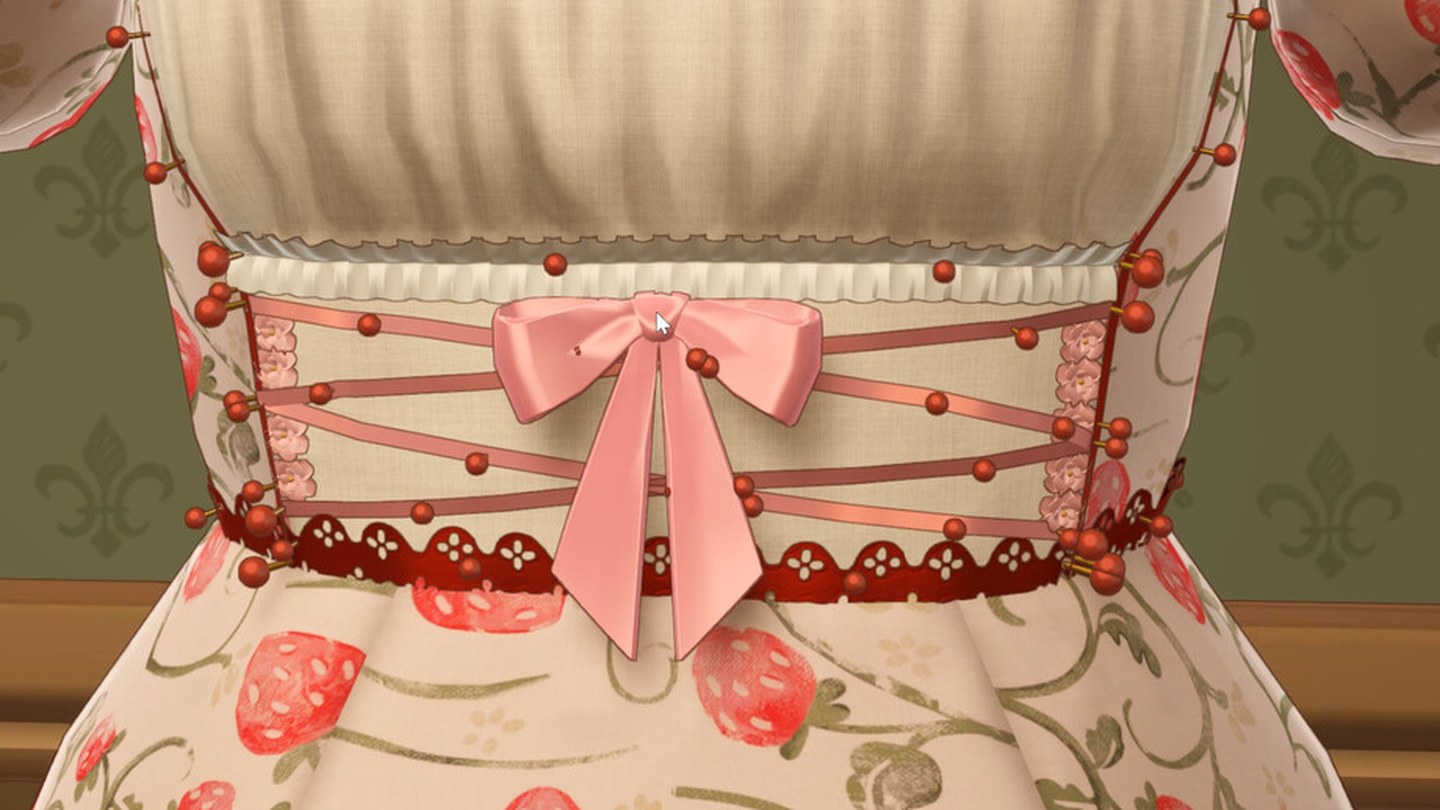
- Steam store listing — Dressmaker — source of the screenshot above, a detail crop of the sewing-complete screen showing the lace band and bow trim in place, and the store description's line about adding "lace trims and other accessories wherever you like with complete creative freedom".
- Steam store API — app details — used to read the store description verbatim and to confirm the support address.
Every claim about how trim behaves is quoted from a developer patch note, and every claim about what is still broken is either the developer's own admission or an explicit statement that no source addresses it. The five-step placement sequence is assembled from the patch bullets rather than from an official walkthrough, because no official walkthrough exists. No build was played to produce this page, and no placement was tested. Numeric height and tilt values are deliberately absent.
Checked on October 19, 2026 against the Steam store listing and the Steam Web API for app 4019220, the developer's own Steam announcements, the official press kit at freelives.net and the itch.io prototype page. Patch notes are quoted verbatim rather than summarised, and each quotation carries the build number and the date it was published. Player reports come from public Steam discussion threads and are labelled as player reports wherever they appear; they are never presented as developer statements, and they are never used to fill a gap the developer left open. Where a detail has not been published, the page says so instead of estimating it. No part of this game was played to produce this page.
Not independently play-tested. This is not a claim that every platform or game version was tested. Source review: Oct 19, 2026.
More Dressmaker Guides
 Dressmaker
Dressmaker Controls After Build 443: Zoom, Pan and Orbit, Mapped
The camera was rebuilt in the October patch and most guides still describe the old one. Here are the current bindings for every scene, the exact wording of what changed, and why gamepad and trackpad users are still waiting.
 Dressmaker
Dressmaker: Why the Finish Button Won't Appear on a Commission
A commission that will not submit is usually an unfinished step, not a bug. The five things to check in order, what Build 443 changed about the red pins, and which parts of this the developer has never explained.
 Dressmaker
Dressmaker Off-the-Rack Dresses: Unlock, Sizing and Gifting
Off-rack dresses have no client attached, and the developer has documented almost none of it. The five official lines, what measurements change, and what nobody has answered.
 Dressmaker
Dressmaker Quality and Grain: Three Scores, One Published Sentence
Grain direction, the Quality target and fabric tags are three separate scores. Only one is explained officially, and the ceiling turns out to be routine rather than rare.
 Dressmaker
Dressmaker Platforms: Windows and macOS Now, Switch and Mobile Only Planned
Dressmaker ships on Windows and macOS. Switch and mobile are planned in the developer's own words but carry no date, PS5 and Xbox have never been announced, and Deck is Playable rather than Verified.
 Dressmaker
Dressmaker Price and Demo: $14.99, No Demo, and What the itch Build Is
Dressmaker costs $14.99 with regional pricing and has no demo. The free build on itch.io is a prototype the developer hosts separately from the game on sale, not a trial of it.